
Stardew Valley remains one of the most beloved farming simulators even in 2026, with its charming pixel art, relaxing routines, and a modding scene that refuses to slow down. But nothing kills the cozy vibe faster than a stubborn error message popping up before you’ve even had your morning virtual coffee. If you’ve been hit with the dreaded “Missing Executable” warning when trying to launch the game from Steam, you’re definitely not alone. The good news? This little gremlin is more of a loud bark than a real bite, and with a few simple tweaks, you’ll be back to petting chickens and mining for iridium in no time.
Before we roll up our sleeves and dig into the fixes, let’s take a quick look at what this error actually means. In plain English, the Missing Executable message is Steam’s way of telling you it can’t find the correct file to start the game. Think of it as the launcher wandering around a dark barn looking for a light switch it just can’t locate. This can happen if the game’s file path has been accidentally altered, if a mod has shuffled things around, or – go figure – sometimes for no obvious reason at all. Console players can breathe easy; this hiccup is strictly a PC (and specifically Steam) affair.
The path to resolution may sound technical, but honestly, it’s more like doing a quick spring cleaning on your digital farm. Below we’ll walk through each fix with step-by-step clarity, so you won’t need a degree in computer science to get things running again. Ready? Let’s grab our virtual toolbox 🔧 and get started.
🚜 Method 1: Verify the Integrity of Game Files
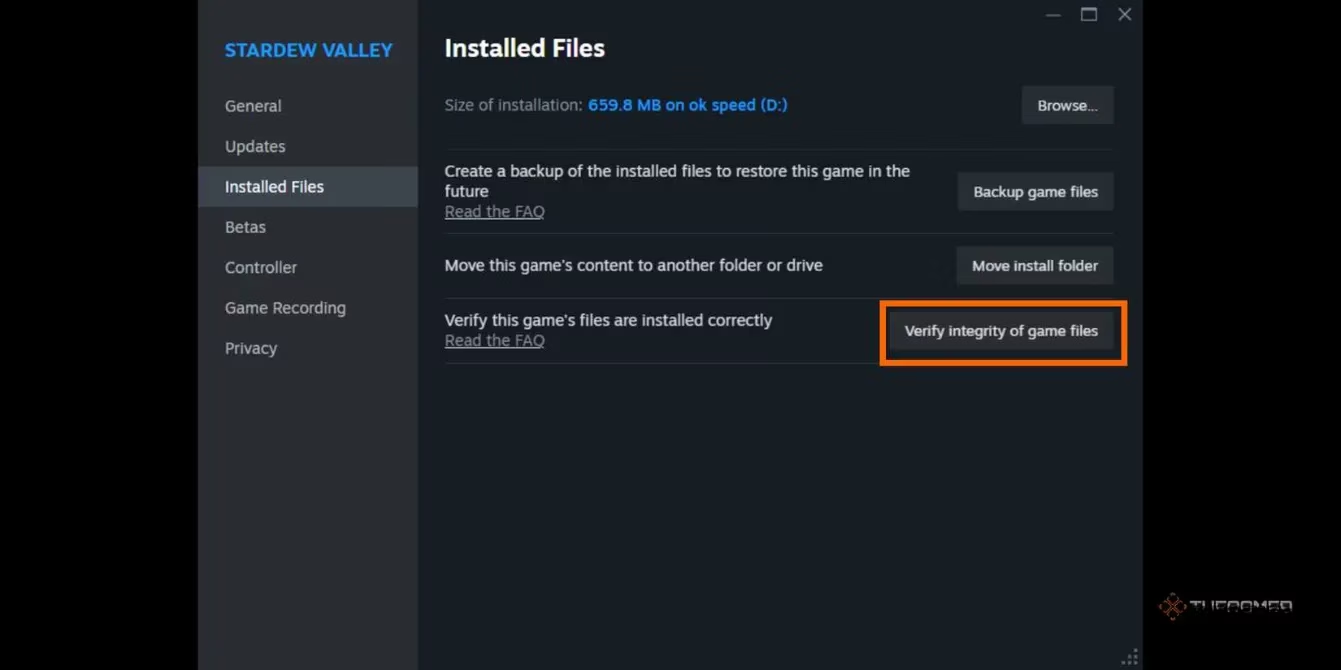
This should always be your first move – it’s the “have you tried turning it off and on again?” of the Stardew world. Steam’s built-in file checker will scan your installation and replace anything that’s missing, corrupted, or just plain forgotten.
-
Right-click Stardew Valley in your Steam library and choose Properties.
-
In the left-hand menu, click on Installed Files.
-
Hit the button that says Verify integrity of game files.
-
Once the process finishes, close and restart Steam entirely, then launch the game again.
If the game boots up without a hitch, give yourself a pat on the back. Still seeing that error? No worries – we’ve got a few more aces up our sleeve.
🧹 Method 2: Clear the Launch Path
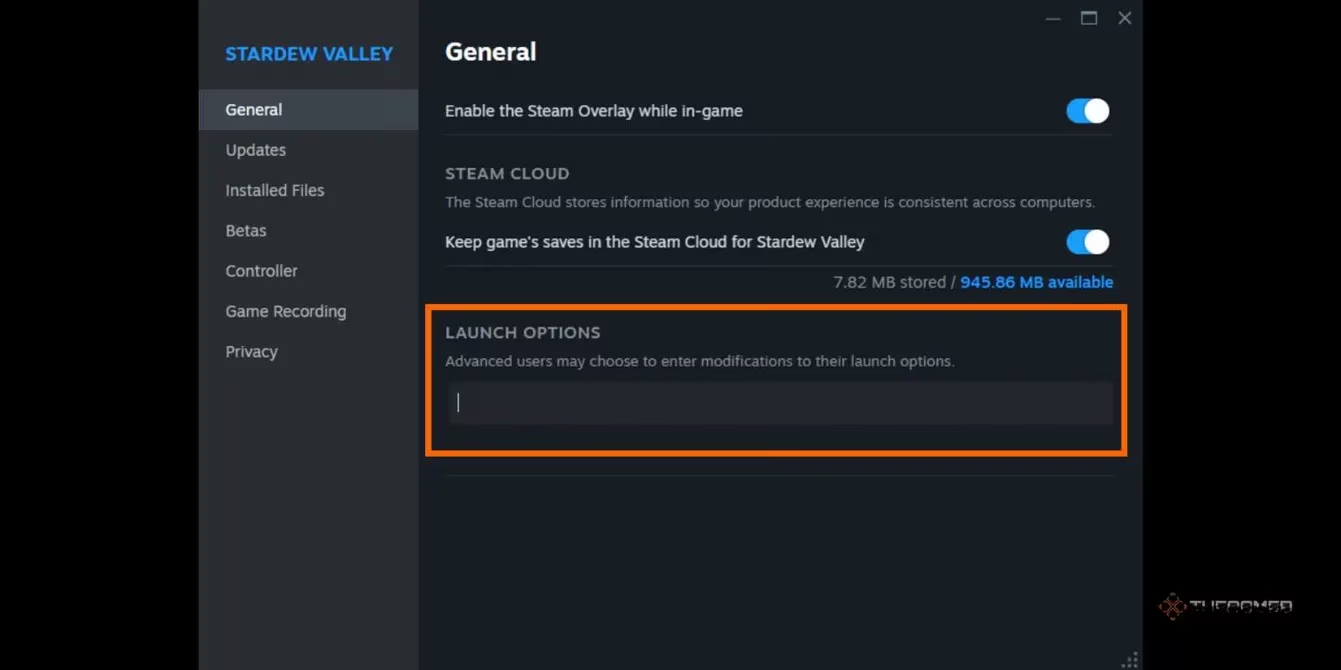
Here’s a sneaky one: sometimes the launch options field in Steam gets a little too cluttered. Any leftover text there can send the executable on a wild goose chase. Clearing it out tells Steam, “Hey, just follow the default path, would ya?”
-
Open Properties for Stardew Valley again and stay on the General tab.
-
Look near the bottom for a box labeled Launch Options.
-
If you see anything inside that box – even a single letter – delete it so the field is completely blank.
-
Close the window and try launching.
Blank is beautiful in this case. It’s like giving the game a fresh, unobstructed runway. If this was the culprit, you’ll be watching that opening cutscene in seconds.
🔄 Method 3: Uninstall and Reinstall Stardew Valley
Okay, I know what you’re thinking: “But what about my save file? I’ve put four real-life years into that farm!” Breathe easy, friend. By 2026, Steam Cloud has been looking after your progress like a faithful sheepdog. Your saved games are safely tucked away online and will come right back after a fresh install.
Here’s how to do it cleanly:
-
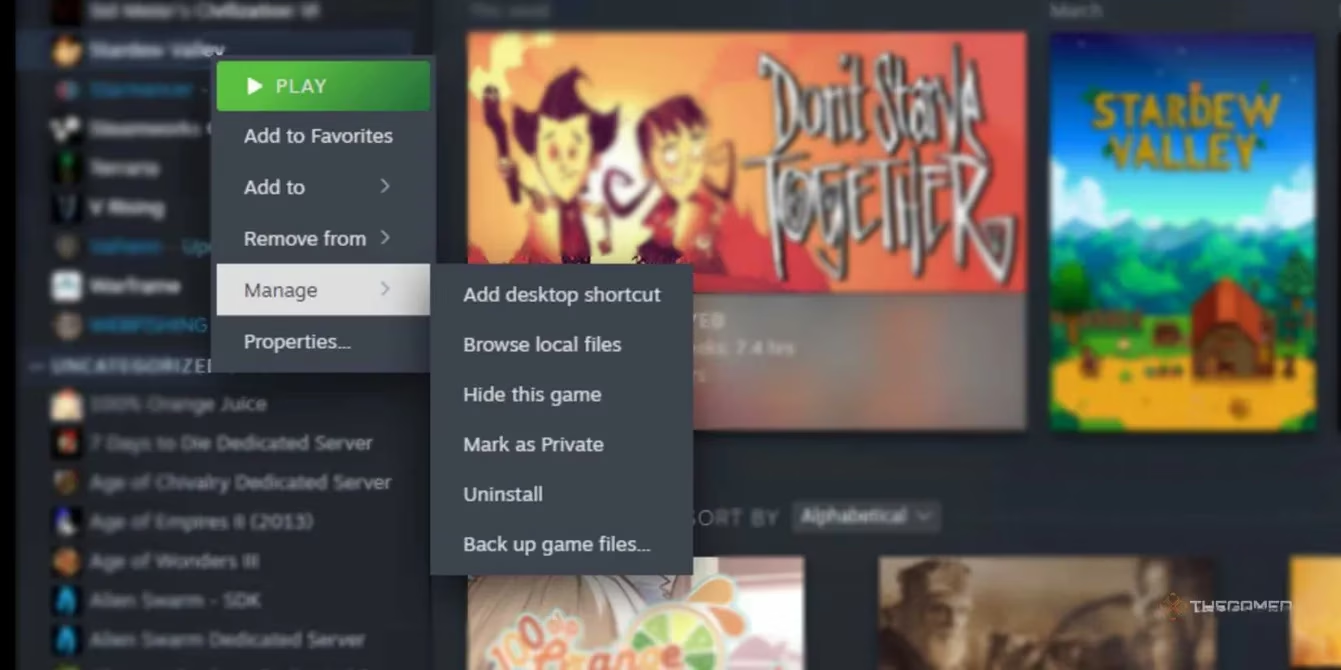
Right-click Stardew Valley in your library.
-
Hover over Manage and then click Uninstall.
-
Wait for the process to complete, then restart your computer (a quick reboot never hurts).
-
Reinstall the game through Steam, and once it’s ready, open it to see if the error has vanished.
For many players, this is the trump card that banishes the Missing Executable for good. If not, we may need to point a finger at the modding interface itself.
🧩 Method 4: Uninstall and Reinstall SMAPI
SMAPI (Stardew Modding API) is the magic behind almost every mod that makes your farm more interesting, from tractor rides to new NPCs. However, a borked SMAPI installation can confuse the game’s startup path and trigger exactly the error we’re chasing. The fix? Out with the old, in with the new.
-
Head over to the official Stardew Valley wiki – it remains the gold standard for up-to-date uninstall instructions based on your operating system (Windows, Mac, Linux).
-
Follow the steps to fully remove SMAPI. This often involves running an installer file but choosing the uninstall option.
-
Once SMAPI is gone, download the latest version (as of 2026, it continues to receive regular updates for compatibility) and reinstall it cleanly.
-
Launch the game again and see if the error has packed its bags.
This step is especially worth your time if the problem started right after a new mod or a SMAPI update. Sometimes, mod tools just need a clean canvas to work on.
📊 Quick Reference: Which Fix to Try First
| Situation | Recommended Starting Fix |
|---|---|
| Error appeared suddenly after a Steam update | Verify game files |
| You recently added or changed launch options | Clear the launch path |
| No mods are installed but error persists | Uninstall and reinstall the game |
| You use mods and SMAPI is involved | Uninstall and reinstall SMAPI |
⚠️ Pro tip: If you’re still staring at that error after all these methods, consider checking for conflicts with your antivirus or firewall. Sometimes these guardians of your PC mistakenly quarantine a game’s executable, thinking it’s a threat. Adding an exception for Stardew Valley could be the invisible key that unlocks everything.
🌾 Wrapping Up
There you have it – a down-to-earth guide for kicking the Missing Executable error to the curb. Whichever method does the trick, the goal is always the same: letting you jump back into Pelican Town without a digital headache. Mods can be brilliant, but they can also be like uninvited rabbits in the vegetable patch if they’re not properly looked after. A little regular maintenance goes a long way.
Now, go on. Your crops are waiting, the villagers are probably gossiping, and there’s a certain mysterious capsule on your farm that needs investigating. Happy farming! 👨🌾👩🌾
Comments